How to Get Nessie Fragments in Prehistoric Farm (Roblox Guide)
Learn how to obtain Nessie Fragments in Prehistoric Farm on Roblox. Discover the latest codes, redemption steps, and gameplay tips to boost your dinosaur farm.
Published: Prehistoric Farm Wiki Editorial Team
Table of Contents
Understanding Nessie Fragments in Prehistoric Farm
In the immersive world of Prehistoric Farm on Roblox, developed by Project Mirvy, resource management is the key to success. As you dive into the gameplay loop—which involves the satisfying process of digging for fossils, hatching exotic eggs, and nurturing your prehistoric collection—you will quickly realize that standard coins aren't the only currency you need to track.
Nessie Fragments have become a highly sought-after item for players looking to optimize their farm. Unlike generic coins, which are primarily used for basic hatchery and shop purchases, Nessie Fragments often serve as a specialized resource for specific upgrades or rare acquisitions. If you find yourself hitting a wall in your progression or struggling to hatch those elusive high-tier dinosaurs, gathering these fragments is likely your next logical step.
Because the game economy is balanced around these specific resources, developers occasionally release promotional codes to help players boost their inventory. Keeping an eye on these drops is essential for any player who wants to maintain a competitive edge without spending countless hours grinding for limited resources.
How to Get Nessie Fragments via Codes
The most efficient way to acquire Nessie Fragments right now is through the game's official code redemption system. Developers frequently release codes to celebrate updates or milestones, and these are often the primary source for rare materials like Nessie Fragments.
As of October 2026, the following code is active for players:
GOGRINDNESSIE: Grants 36 Nessie Fragments.
It is important to note that codes in Prehistoric Farm are time-sensitive. They are often released alongside game updates (such as the "Update 05" cycle) and may expire without warning. We recommend checking the official game Discord server or keeping an eye on community-sourced update lists to ensure you don't miss out on these limited-time boosts.
Tip
Always use the "Copy" function provided in community guides or the game's official social channels when inputting codes. This prevents common errors caused by accidental spaces or capitalization mistakes that the game system may not recognize.
Step-by-Step: How to Redeem Codes
Redeeming codes in Prehistoric Farm is a straightforward process, but it requires one crucial prerequisite: you must join the developer's group. If you skip this step, the game will not process your code, no matter how many times you try to enter it.
Launch the Game: Open Prehistoric Farm within the Roblox client.
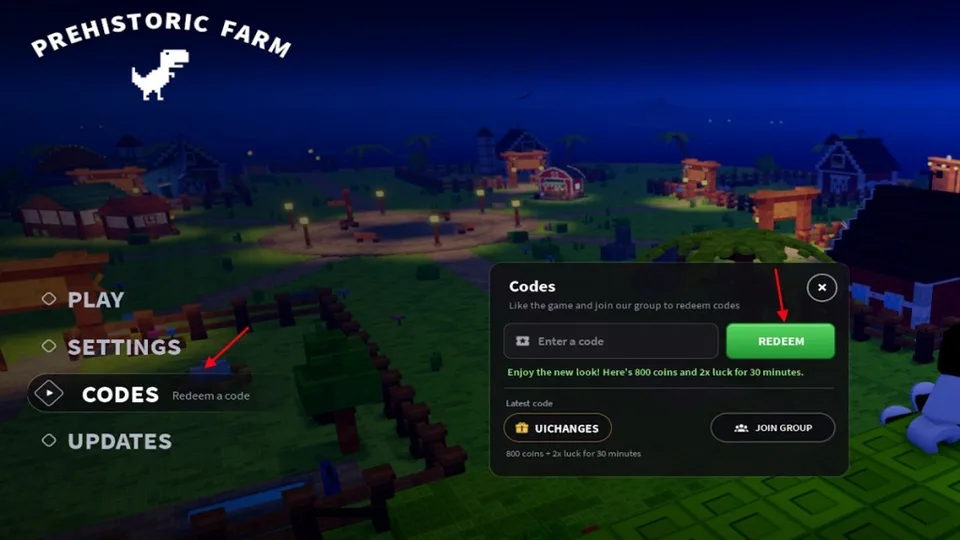
Open the Menu: Once you are in the main game world, look for the Codes button, typically located on the main user interface.
Input the Code: A text box will appear. Type or paste your code (e.g., GOGRINDNESSIE) into the field labeled "Enter a code."
Redeem: Click the Enter or Redeem button. If the code is valid and you have met the requirements, the rewards will be added to your account instantly.
Troubleshooting Common Redemption Issues
It can be frustrating when a code doesn't work, especially when you are counting on those Nessie Fragments for a specific upgrade. Before assuming the code is broken, run through this quick checklist to ensure you haven't missed a simple requirement.
Group Membership: Have you joined the Project Mirvy group? This is the most common reason for redemption failures.
Typo Check: Did you include an accidental space at the beginning or end of the code? The system reads spaces as characters, which will invalidate the entry.
Case Sensitivity: While many Roblox games are case-insensitive, it is safest to input the code exactly as it appears in the announcement (usually all caps).
Expiration: Check if the update cycle has changed. If a code was released for a previous version, it may have been deactivated by the developers.
If you have confirmed all of the above and the code still fails, it is highly likely that the code has simply reached its expiration date. In such cases, the best course of action is to stop relying on that specific code and look for the latest announcements on the official Discord server.
Tips for Managing Your Dinosaur Farm
Once you have secured your Nessie Fragments and other bonuses from codes, the next challenge is managing them effectively. In Prehistoric Farm, resources are meant to be invested, not hoarded. Here is how you can maximize your gains:
Focus on Hatching Strategy
Don't spend your coins and fragments on the first egg you see. Focus your resources on eggs that have a higher probability of yielding rare dinosaurs. If you are using fragments to boost your luck, ensure you have enough coins saved up to perform multiple hatches back-to-back.
Balance Your Upgrades
Coins: Use these for the bread-and-butter upgrades—hatching basic eggs and expanding your farm capacity.
Fragments: Save these for when you need a specific boost, such as "Double Luck" or "Double EXP," which can significantly speed up your progress during active gameplay sessions.
By balancing these resources, you ensure that you are always moving forward in the game rather than getting stuck in a cycle of farming basic materials. Remember, the game is designed to be a marathon, not a sprint. Use your rewards wisely to push past the difficult progression plateaus.
Can I get Nessie Fragments without codes?
Currently, codes are the primary method for obtaining Nessie Fragments. While gameplay activities like digging fossils yield coins and other items, fragments are specifically tied to promotional rewards.
Why does the game say "Code Invalid"?
This usually means the code is expired or you have not joined the Project Mirvy Roblox group. Double-check your group status and try re-entering the code.
Are there other ways to get free items?
Yes, keep an eye on the official Discord server for the game. Developers often hold community events, giveaways, or announce new codes directly to their player base.