How to Join the Prehistoric Farm Group on Roblox: A Quick Guide
Learn the essential steps to join the official Prehistoric Farm group on Roblox to unlock rewards, stay updated on game news, and enhance your gameplay.
Published: Prehistoric Farm Wiki Editorial Team
Table of Contents
Joining the Prehistoric Farm Community
In the expansive world of Prehistoric Farm, progression is about more than just digging for fossils or sailing to the Cambrian Isles. To truly get the most out of your experience, connecting with the community is vital. Many players wonder how to join the official group, as it is frequently linked to code redemption requirements and exclusive community updates.
To join the group, you should navigate to the official Prehistoric Farm game page on Roblox. Once there, scroll down to the "About" section or the creator information. Clicking on the developer name, "Project Mirvy," will take you to their profile or group page. From there, you can locate the "Join Group" button. Being part of this group not only keeps you informed about the latest patches, such as the recent "Update 06" and "Update 07" content, but it also ensures you meet the eligibility criteria for certain promotional codes that developers release to reward active members.
Why Group Membership Matters for Your Farm
Joining the group is more than a social gesture; it is a tactical move for any serious player. According to community reports and recent guides, several reward codes require you to be a member of the official group before the system will validate your entry.
Tip
Always check the game's settings menu when you encounter a "code not working" error. Often, the game checks your group membership status in real-time before applying rewards like coins or XP boosts.
By staying connected through the group, you gain a significant advantage in the following areas:
Early Access to News: Get the latest info on upcoming islands and mechanics before they are broadcasted in the main lobby.
Code Eligibility: Ensure you never miss out on limited-time rewards by meeting all developer-set requirements.
Community Interaction: Engage with other players to trade tips on the best shovels to use or how to efficiently grind for Nessie fragments.
Maximizing Your Gameplay with Codes
Once you have joined the group, you can focus on optimizing your farm. The game relies heavily on effective resource management, and redeeming codes is the fastest way to get a head start. As of October 2026, players have been actively using codes such as "UPDATE05" for 20,000 coins and double XP, or "NESSIEISHERE" for rare items.
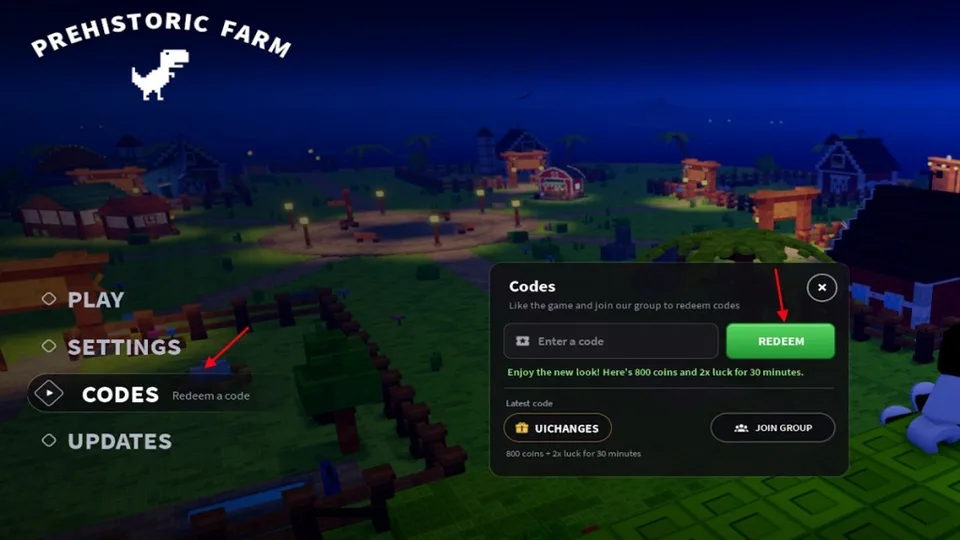
Launch Prehistoric Farm from the Roblox dashboard.
Open the main menu and navigate to the "Settings" tab.
Locate the text box labeled for code redemption.
Ensure you have joined the official group to satisfy validation checks.
Type your code carefully and click "Redeem" to claim your boosts.
Exploring the Cambrian Isles
After you have secured your initial resources through group-exclusive rewards and codes, the next step is to head to the docks. Sailing to the Cambrian Isles is a core mechanic for mid-to-late game progress. This is where you will find the glowing dig sites that house the fossils necessary for hatching new dinosaurs.
Don't be discouraged by the travel time; it is a fundamental part of the game's loop. Once you arrive at the islands, focus on clearing the dig sites systematically. Players often suggest bringing a high-tier shovel to increase your yield per dig. If you find yourself struggling to locate the islands, keep an eye on the in-game map; it clearly marks the Cambrian Isles to the east.
Frequently Asked Questions
Do I need to be a certain level to join the group?
No, there is no level requirement to join the official Project Mirvy group. However, remember that some specific in-game codes may require you to reach Level 6 before they can be redeemed.
What if the code still fails after I join the group?
If a code is valid but fails, ensure you have joined the group, then try leaving and re-joining the game server. This forces the game to refresh your player data and recognize your new group status.
Is there an official Discord server for Prehistoric Farm?
Yes, community resources indicate that an official Discord exists. It is a highly recommended place to learn about updates, share your progress, and interact with the developers directly. Always use caution and only join links provided through official Roblox game pages.